
Subtitle: The math on unanswered calls is brutal. Here is what the data says, which tools are worth the money in 2026, and how to set one up in a weekend.
My daughter scored her first goal on a Tuesday afternoon.
I was on the sideline. Not hunched over my phone, one eye on the field, waiting for a notification. Present. Fully. The way you promise yourself you will be when you are up at 5 AM trying to get ahead of the day.
That kind of afternoon does not happen by accident when you own a business. It takes systems. Specifically, it takes a system that picks up the phone when you cannot.
The one I run now: an AI phone agent that handles inbound calls 24 hours a day. It answers questions, books appointments, qualifies leads, and routes anything urgent to me directly. Most callers get what they need without ever reaching a voicemail. Some of them never know they are talking to AI.
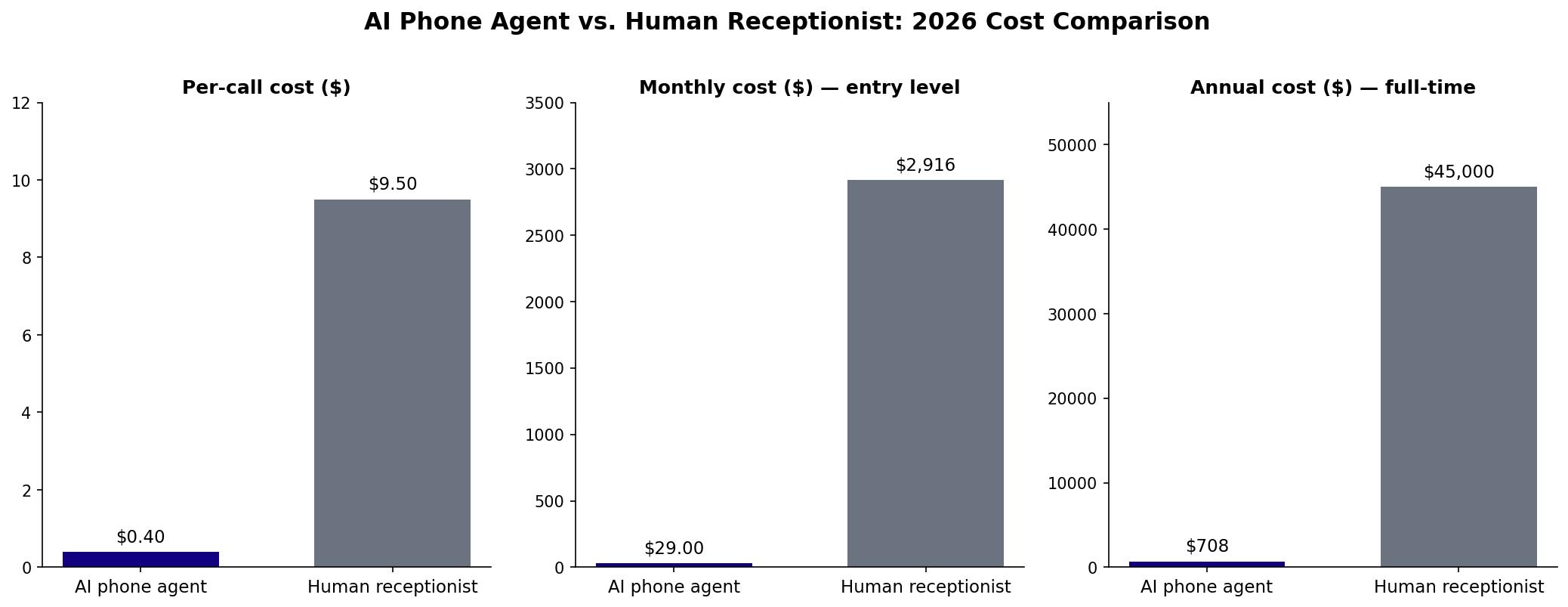
Here is the direct answer to what this post is actually about: Yes, AI phone agents are ready for small business in 2026. The resolution rates are high, the cost is low, and the setup is a weekend project, not an IT deployment. If your business is losing calls because you cannot always pick up, this technology exists to fix that, starting at $29 a month.
The rest of this post covers why the math makes this a no-brainer, which tools are worth looking at, and exactly how to set one up without breaking anything.
Key Takeaways
- Small businesses miss 62% of their inbound calls. Most of those callers never try again.
- The average small business loses roughly $126,000 per year to unanswered calls.
- AI phone agents resolve around 89% of calls without human intervention and cost $0.40 per call versus $7 to $12 for a human agent.
- Monthly pricing runs $29 to $349 depending on features and call volume. A full-time receptionist costs $35,000 to $55,000 per year.
- Setup takes a weekend. You do not need a developer, a special phone system, or a long-term contract to get started.
Why Missed Calls Are Killing Small Business Revenue Quietly
The missed call problem is not new. What is new is how many business owners know about it and still do nothing.
Here is why nothing gets done: the damage is invisible. A call goes to voicemail. The caller hangs up. There is no record of the potential job, no invoice that never got created, no deal marked as lost. The business owner closes their day thinking it was quiet, when what actually happened was that the pipeline was leaking.
Industry data from multiple sources puts the missed-call rate for small businesses at 62%. More than half of inbound calls go unanswered.
Of the callers who hit voicemail, 85% never try again. They do not wait for a callback. They move on to the next name in their search results.
A study from Phone2 put a dollar figure on this. The average small business loses around $126,000 per year to missed and unanswered calls. For service businesses, each unanswered call represents between $100 and $1,200 in lost revenue, depending on the industry and average ticket size.
That is not a customer service problem. That is a systems problem, and systems problems have systems solutions.
What the Data Actually Says About AI Phone Agents in 2026
Before getting into tools and setup, here is the state of the technology.
A 2024 benchmark from AllAboutAI measured resolution rates across enterprise AI voice platforms. The number: AI voice agents are resolving 89% of customer calls without ever routing to a human. That is a platform-wide average, not a cherry-picked pilot result from a Fortune 500 company. It applies to the same technology available to a 10-person service business today.
Gartner projected that AI-powered contact center solutions would generate $80 billion in labor cost savings by the end of 2026. The headline number is enterprise-scale, but the underlying technology is what small business platforms are built on. The price point just got democratized.
The per-call economics are stark. Human agent cost runs $7 to $12 per call when you factor in wages, training, turnover, and management time. AI phone agents handle calls at roughly $0.40 each. For a business taking 200 calls a month, that annual gap approaches $18,000.
None of this is theoretical. These tools have been processing millions of real calls from real customers. The failure modes are known. The good platforms have addressed them. The technology has crossed the line from "promising" to "production-ready."
The Belief That Is Costing You Calls
Most small business owners who have heard of AI phone agents have not set one up yet. The most common reason they give is that they are worried customers will resent talking to AI.
That belief is a few years behind the current data.
A 2025 Salesforce survey found that 61% of customers now prefer AI interactions for routine service tasks over waiting for a human. Not because they prefer AI in principle. Because they prefer fast, consistent, and available. AI delivers all three. Voicemail delivers none of them.
The framing that works for my clients: an AI phone agent is not a replacement for you. It is a coverage layer. It handles the calls that do not need you so that the calls that do actually reach you, without noise around them. You stay in the loop on your terms, not the caller's terms.
That shift, from reactive coverage to on-your-terms coverage, is the real change this technology makes possible.
Which Tools Are Worth Looking At
The market broke into two categories: pure AI voice agents and hybrid systems that pair AI with human backup.
Pure AI agents handle calls autonomously using a knowledge base you provide. They answer questions, schedule appointments, and qualify leads based on the information you feed them. The main players in this category:
- Dialzara ($29/month): Entry-level, solid conversation quality, integrates with most calendars. Good starting point for businesses under 100 calls a month.
- Rosie ($49/month): Slightly more capable than Dialzara, cleaner setup process, strong for home services and appointment-based businesses.
- Goodcall ($59/month): Best mid-market option for most small businesses. Handles complex multi-turn conversations well and has a straightforward dashboard.
- My AI Front Desk (free to $99/month): Free tier is worth testing before you commit. The paid tiers add integrations and customization.
Hybrid services add a pool of human receptionists behind the AI layer. The AI absorbs volume; a person handles the exceptions and anything the AI cannot resolve.
- Smith.ai ($95/month AI tier, $300/month with human backup): The AI tier alone is competitive with the pure platforms. The human tier is worth it for businesses where complex calls, complaints, or high-stakes leads show up regularly.
- Ruby (pricing varies): Similar to Smith.ai. Skews toward professional services like law and finance where callers expect a human.
Ringly.io ($349/month) sits in its own category. It handles both inbound and outbound calls, integrates with CRM systems, and has analytics built in. If you are managing a sales pipeline alongside your service calls, it does things the lighter tools cannot touch. For most small business owners starting out, it is more than you need.
My recommendation for the majority: start with Goodcall at $59 or Rosie at $49. Both have enough conversation quality to handle real calls, simple setup flows, and calendar integrations that work. If you are in home services, legal, or any industry where missing a new-client call means a real financial hit, add Smith.ai's hybrid tier.
How to Set Up an AI Phone Agent in a Weekend
Step 1: Audit your current call situation.
Pull 30 days of call data from your phone, your Google Business profile, or your phone system if you have one. Count missed calls and missed call-backs. Estimate what those calls were worth based on your average job or ticket size. Write the number down. That is your business case for every dollar you spend on coverage.
Step 2: List the five most common reasons people call your business.
That list becomes your AI's job description. Most AI phone agents can handle FAQs, appointment booking, pricing questions, directions and hours, lead qualification, and basic service status updates without any special configuration. Anything requiring real judgment, a contract, or authority to make a financial decision routes to you.
Step 3: Match the tool to your call volume and complexity.
Under 100 calls a month: Dialzara ($29) or My AI Front Desk (free tier). Between 100 and 500 calls: Goodcall ($59) or Rosie ($49). Over 500 calls, or if your calls frequently involve complex decisions or high-value clients: Smith.ai hybrid ($300) or Ringly.io ($349). Do not over-buy for where you are today.
Step 4: Build your knowledge base before you turn anything on.
Every platform asks you to provide information about your business. Pull together: your website FAQ, your pricing sheet, your hours and service area, your top three customer objections and how you usually handle them, and any policies customers ask about regularly. This step takes two hours and it is the single biggest factor in how well the AI performs.
Step 5: Configure your routing rules.
Decide what the AI handles on its own and what it escalates. A rule that works for most service businesses: anything involving a complaint, a price negotiation, a refund, or a dollar amount above your average ticket goes directly to you. Everything else stays with the AI. Start conservative. You can always loosen the rules once you see how the AI handles real calls.
Step 6: Test before you go live.
Call your new number from three different phones. Ask it something easy. Ask it something it will not know the answer to. Ask it to book an appointment. Ask it to book an appointment. Ask it a confusing question. Document what breaks. Fix the gaps in your knowledge base before your customers find them.
Step 7: Monitor call transcripts for the first two weeks.
Every platform logs calls and most give you a readable transcript. Read them daily for the first two weeks. You will catch questions you did not anticipate, find gaps in your knowledge base, and occasionally catch a caller who managed to confuse the system. Two weeks of monitoring gets most setups running clean without your daily involvement.
Those transcripts are also raw material for follow-up — here's the AI workflow that turns any call recording into a summary, action items, and a ready-to-send follow-up email in under 10 minutes.
Frequently Asked Questions
Will customers know they are talking to an AI?
The better platforms disclose that they are AI when asked directly. Whether callers notice on their own depends on your script quality and the platform you choose. Goodcall and Smith.ai's AI tier hold up well in normal conversation. Unusual requests, angry callers, and situations the AI was not trained on are where the seams show. Design your routing rules to catch those before the caller gets frustrated.
Can an AI phone agent book appointments directly into my calendar?
Yes. Most platforms connect to Google Calendar, Calendly, and major industry-specific booking tools. The AI checks real-time availability and books without your involvement. Some platforms charge extra for calendar sync or limit it to higher tiers. Confirm before you commit to a plan. If booking is a core use case for you, make sure it is included in the tier you are purchasing.
What happens when the AI cannot handle a call?
Every platform has escalation logic built in. Depending on your configuration, the AI will either transfer the call to you in real time, send you a text summary and ask you to call back, or flag the transcript for review. You define what triggers escalation, so you decide what "cannot handle it" means for your business. The default settings on most platforms are a reasonable starting point.
How long does initial setup actually take?
Realistically, two to four hours for the core setup and another two to three hours of adjustments in the first two weeks. Rosie and Goodcall are designed for non-technical operators and have guided setup flows. Give yourself a full weekend rather than trying to rush it between calls. The knowledge base is where most of the time goes, and that investment pays off in call quality for months.
Is an AI phone agent secure for handling sensitive information?
The reputable platforms are HIPAA-aware and SOC 2 compliant, but compliance level and coverage vary by tier. If your business handles health information, financial data, or legal matters, verify the platform's certifications before you go live. As a general rule, do not design your AI to capture sensitive data in the call itself. Route anything involving account numbers, medical details, or legal specifics to a human.
The Point of All of This
Building a business that requires you to be at your desk every time the phone rings is not a business. It is a job with extra steps and extra stress.
AI phone coverage does not fix everything. The platforms miss things occasionally. They get tripped up by background noise and heavy accents. They sometimes book appointments at the wrong time. None of them are perfect.
But they pick up 100% of the time. At 11 PM. On a Saturday. On the Tuesday afternoon when your daughter scores her first goal. While your competitor's voicemail is still asking callers to leave a message after the tone.
Do the math on what your missed calls cost you. Then decide if $49 a month covers it. And if you are ready to think bigger about what AI can take off your plate, here is the full picture of what AI agents handle in 2026.
My daughter scored again last Thursday. I was there for that one too.
- The AI Dad
Keep Learning
- Do AI Agents Actually Handle Your Everyday Tasks — Or Is That Still Hype in 2026? — The 5 everyday tasks AI agents are taking off small business owners' plates right now, with the time savings quantified and the exact no-code setup.
- What Can AI Agents Actually Do for Your Family and Business in 2026? — Agents vs. chatbots, and how parent entrepreneurs are deploying agents for household and business tasks right now.
- Is Your Sunday Night Planning Ritual Still Taking 3 Hours? Here's the AI System That Fixes That — A 20-minute AI-powered weekly reset that covers your business and your family in one Sunday session.
About the Author
Voice AI has a risk side too. I wrote about how to protect your small business from AI-powered scams, including the one approval rule that stops most of them.
Warren Schuitema is the Owner and CEO of Matchless Marketing and Matchless AI, based in Allegan, Michigan. He spent 16 years in supply chain and manufacturing systems before building an AI consulting practice focused on small business operators and parent entrepreneurs. He writes as the AI Dad, covering practical AI tools and systems for people who want to grow their business without losing their life to it. His clients run cleaner operations, close the laptop earlier, and stop losing revenue to the problems that have automated solutions.